Section Definition - Concrete
This tab is used to define a concrete section. The left panel displays the names of the sections available in the model, while the right panel shows the attributes of the selected material. Other tabs allow you to define steel and generic sections. There are various section shapes that can be selected, each requiring a different set of dimension parameters to be defined. The program automatically calculates all the required section properties based on the given dimensions. All properties are calculated using closed-form solutions, except for the torsional constant, which is calculated by numerically solving the Prandtl stress function. However, the torsional constant for circular shapes is calculated using a closed-form solution.
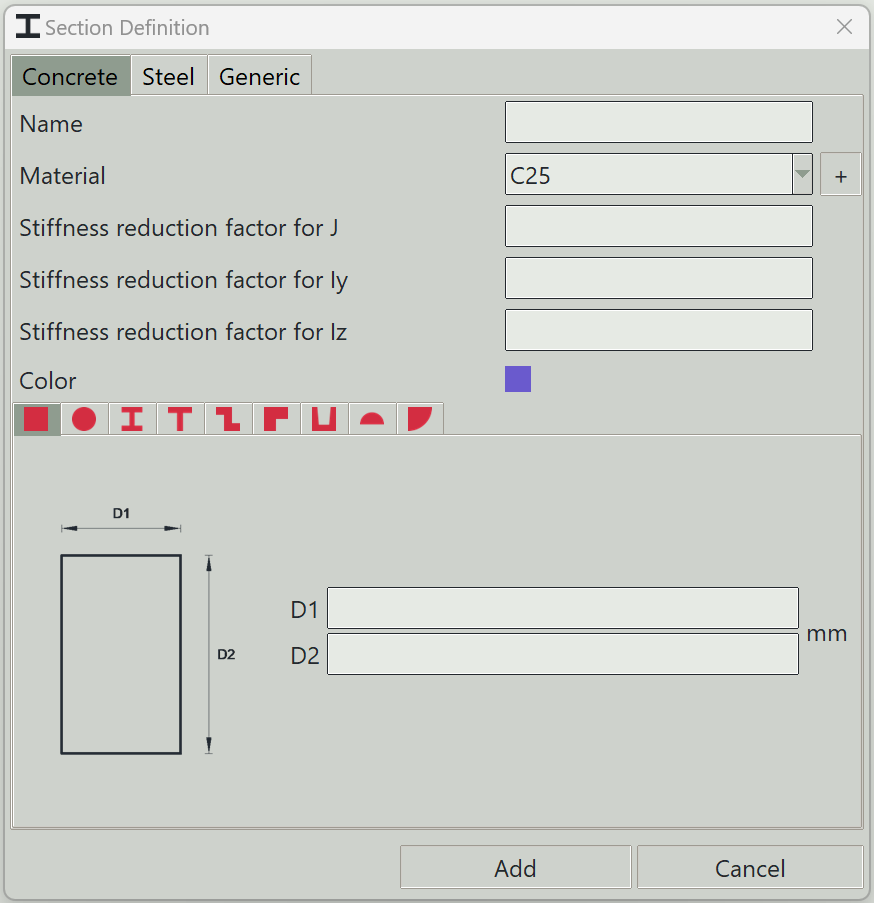
1. Name
A unique name for the section. It can be left empty, and the program will generate one automatically.
2. Material
The material to assign to this section.
3. + button
Opens the material definition window so that you can add a new material.
4. Stiffness reduction factor for J
A factor to modify the torsional constant of the section.
5. Stiffness reduction factor for Iy
A factor to modify the second moment of area about the y-axis.
6. Stiffness reduction factor for Iz
A factor to modify the second moment of area about the z-axis.
7. Color
A color to give to this section for visualisation.
8. Tabs
A number of tabs are available to select the section shape. Each shape requires different dimensions, which can be entered in the provided fields.
9. Delete button
Deletes selected sections from the model.
10. Add button
Adds a new section or updates an existing one.
11. Cancel button
Closes the window.